We had an interesting situation arise at work the other day so I’ve decided to write it down.
We needed to access a Windows server in another network via the Remote Desktop Protocol (RDP). As you probably guessed, RDP lets you control a Windows computer remotely. Imagine that. The problem was that the server was in a network that we didn’t have direct access to. Our only way into this network was through a Linux server to which we had SSH access. SSH tunneling to the rescue!
A note about SSH: SSH stands for secure shell. In layman’s terms, it allows secure access to a remote system or device over an insecure network. All traffic between the client and the server is encrypted.
Now, I do SSH tunneling on a fairly regular basis for various things. For example, if your wonderful IT department has blocked YouTube in your office, you can just send all traffic in Firefox through an SSH tunnel back to an SSH server at your house and watch all the YouTube you want. For our RDP dilemma, all I had to do was forward the port for RDP through an SSH connection to the Linux server on the network where the Windows server was and then tell the Linux server to forward that port to the Windows server. Once the SSH connection was established, I just needed to tell my RDP client to connect to localhost and I was connected to the Windows server. Let’s see what this looks like.
Linux server: 192.168.1.10
Username on Linux server: bob
Windows server: 192.168.1.200
RDP port: 3389
SSH port: 22
ssh -L 3389:192.168.1.200:3389 [email protected]
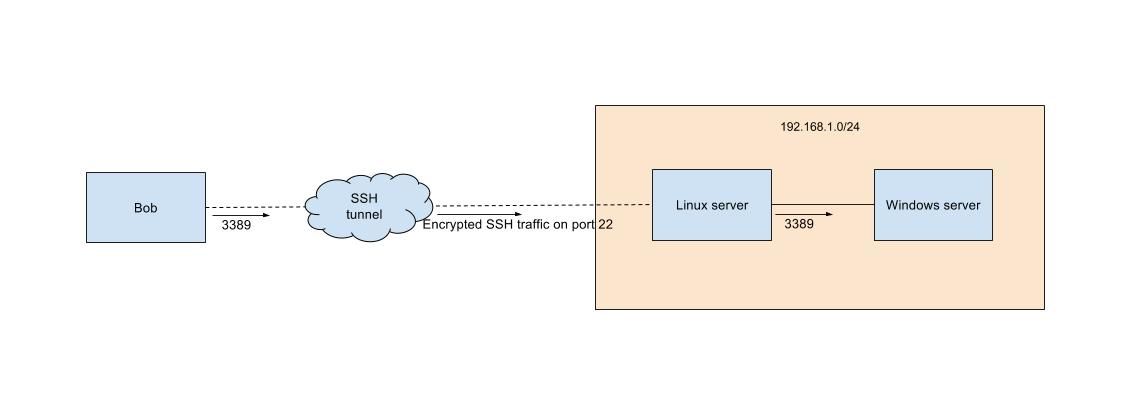
According the SSH man page, -L specifies that the given port on the local (client) host is to be forwarded to the given host and port on the remote side. So in this example, the first 3389 is specifying the source port and the second 3389 is specifying the destination port. Bob is telling the Linux server (192.168.1.10) to send any traffic originating on port 3389 from his computer to port 3389 on the Windows server (192.168.1.200).
The SSH command will work on Linux, Mac, and dare I say the Ubuntu Shell on Windows 10 (haven’t tried this). Other Windows options include, but aren’t limited to, Cygwin, Putty, and SecureCRT.
This is but a taste of what SSH is capable of. SSH can tunnel pretty much whatever kind of traffic you want to throw at it. If anything, I hope this shows a little bit of the power that SSH has and that it can help you in your endeavors of becoming a formidable wielder of SSH tunnels.