From time to time I notice that the performance on my 2.4 GHz WiFi is somewhat lacking. I decided to do a bit of investigation and found out that some of the other wireless networks around me were configured in a less than ideal fashion.
By less than ideal, I mean they were shouting all over my own signal. Yes. I am a victim of WiFi interference. Whether you’ve noticed it or not, you’ve probably been victimized by similar WiFi travesties. The goal of this article is to help shed some light on why it’s important to run your WiFi on the proper channel and how it’s beneficial not only to you, but to those around you as well. Let me also preface this article by mentioning a wonderful app called WiFi Analyzer. It’s an Android app that can see what WiFi devices are operating around you. iPhone users can use Network Analyzer Lite (don’t quote me on that as I don’t have an iPhone).
I’ve gone back and forth quite a bit as I’ve thought about how to approach this subject, but hopefully I’ve conveyed it in a way that’s easy to understand. The specifics of wireless technology can become quite exhausting and boring. WiFi has a lot of its own terms and vocabulary so I’m going to leave most of that out. But I’ve tried to be detailed enough to cover the basic principles of WiFi why it’s important to select the proper channel and avoid interference with neighboring wireless devices.
If you’re going to run WiFi, you will deal with two basic types of interference: co-channel and adjacent-channel. WiFi can also be interfered with by non-WiFi devices but I won’t cover it here as it’s usually self inflicted. Just keep your access point (AP) or wireless router away from the microwave or anything metal and it’ll be okay.
Before we get into the types of interference, let me first show this channel graph I kifed from Wikipedia.
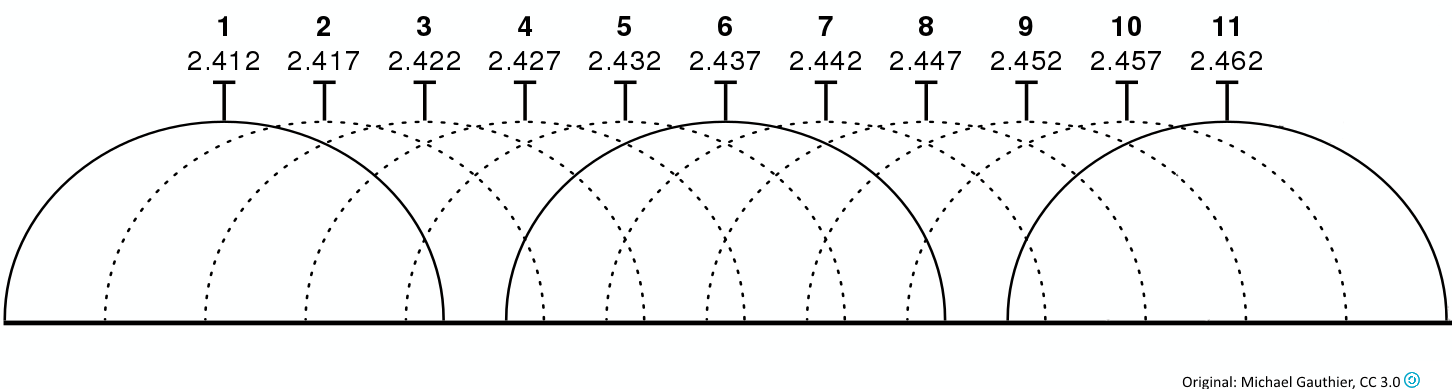
In the United States, we are limited to channels 1-11. The channel band runs from 2.412 to 2.462. Each channel is 22 MHz wide but is typically rounded to 20 (10 MHz above and below the center of the channel). The channel centers are 5 MHz apart (2.412 on channel 1, 2.417 on channel 2, and so on). It doesn’t take very complicated math to figure out that if the channel centers are only 5 MHz apart but the channels are 20 MHz wide that some overlapping might be taking place. Taking a closer look at the image, you’ll notice that channels 1, 6, and 11 don’t overlap. These are the magic channels and are what you want to use. Let’s find out why.
We’ll start with co-channel interference or CCI. CCI happens when neighboring WiFi devices operate on the same channel. This isn’t actually a problem as long as the number of devices broadcasting on the channel doesn’t grow out of hand. When more than one AP operates on the same channel and if they are close enough to hear each other, the devices connected to them have to compete for time to use the airspace or medium. Only one device talks at a time. CCI is like a meeting at work or a school classroom. The presenter or teacher is like the AP and everyone else is a device on the network. Typically in these settings, everyone speaks one at a time and in turn. When a WiFi device wants to communicate, it checks the medium to see if it is busy or idle. If it’s idle, the device will attempt to transmit its data. If it’s busy, the device will wait until the medium is idle before transmitting. If the amount of contention is low, you probably won’t notice any decrease in performance. But in a high density area, performance can take a big hit and generally leads to whining about the internet being slow when in actuality, the WiFi channel is congested. When choosing a WiFi channel, pick the channel that is least congested. In other words, you should generally pick the channel that has the least number of APs already operating on it.
Next is adjacent-channel interference or ACI. Remember the overlapping channels in the image above? ACI is when two or more APs use overlapping channels. For example, channel 9 overlaps with 6 and 11. Therefore, the device on channel 9 causes interference for devices on channels 6 and 11. ACI is the worst. It is the bane of every wireless engineer’s existence. Sometimes it happens because someone wants to cause problems. It mostly happens because of ignorance. I’ve seen people put their AP on a channel other than 1, 6, or 11 because nothing else is on it. You might think that because no one else is using it, it must be better because your gear will be the only thing on it. You might say, “Yay! I’m all by myself here.” Newsflash: you’re not. ACI is like being at a big party where a lot of different conversations are going on simultaneously. If one group is too close to another group or is being too loud, the other groups will have to talk louder in order to communicate. This isn’t the case with teenagers, of course. At their parties, conversations all happen with messaging over instatwitface. But at parties where actual talking takes place, the different groups will at some point not be able to talk any louder and the words “I can’t hear you” will begin to be said. This is exactly what happens with ACI. If a device operates on an overlapping channel, it has the potential to cause problems for devices on other channels. If the interference is strong enough, devices won’t be able to talk to their APs consistently and will experience packet loss or “slow internet.” Continuing to use channel 9 as an example, users on channels 6 and 11 would be impacted by devices on channel 9. The inverse is also true. Users on channel 9 would be impacted by users on channels 6 and 11.
Let’s go back to my original problem. Here are the wireless networks that are visible to me from my house.
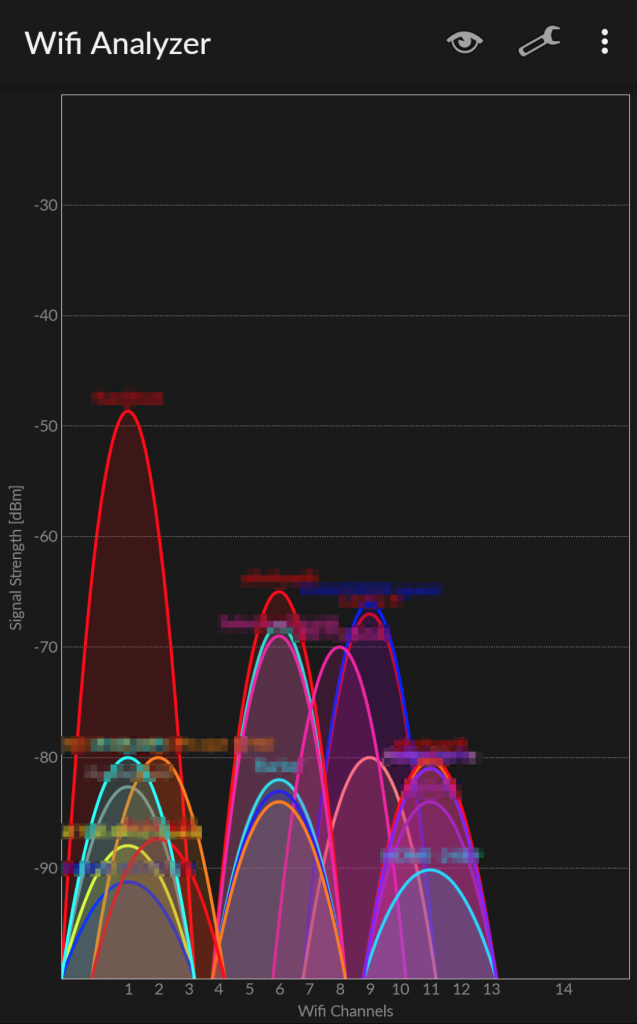
As you can see, the majority of my neighbors are on 1, 6, or 11. But a few offenders are out there. I am on channel 1. Two other networks are visible on channel 2. Normally, I would just move my channel to 6 or 11, but in this case, I can see networks that operate on channels 8 and 9 and at relatively high signal strengths. I know for a fact that service technicians from a local ISP that shall remain nameless put their customer’s APs on channel 8. This is an egregious error on their part and frankly deserves a flogging. In this case, moving to 6 or 11 would be worse than staying on 1 since the signal strengths from the devices on channel 2 are pretty low. So channel 1 is where I am and channel 1 is where I stay. I will not be moved…for now.
Hopefully, this provides a better understanding of the magic wireless box you bought from your local electronics store (or wherever) so please, for the love of football, put your WiFi on channel 1, 6, or 11.