
Okay it's not an error - more of an annoyance actually. Here's my problem. I want to use IPv6. My wife wants to watch Netflix. My internet provider doesn't provide IPv6 so I brought up an IPv6 tunnel to Hurricane Electric. My wife couldn't watch Netflix anymore because.....reasons.
I'll spare you the nitty gritty and not take a deep dive into all the history of what's going on here. Netflix has decided that if you're communicating with them via an IPv6 tunnel they want nothing to do with you because you're breaking a rule that they made up. So what's their beef?
IPv6 is great. The benefits of using it versus using IPv4 far outweigh the cons. The cons come mostly from whiners and those who simply don't understand it. The short version is that Netflix deployed IPv6 in their network - a task for which I applaud them. Few internet providers have deployed IPv6 in their networks - a task, or lack thereof, for which I don't applaud them. Companies like Hurricane Electric operate as tunnel brokers with which you can establish an IPv6 tunnel to obtain your own prefix. Once you have your prefix, you can start assigning IPv6 addresses to hosts in your network at which point all IPv6 traffic will be routed over the tunnel and out to the Internet. Again I ask - what's Netflix's beef?
It turns out that some people ruined it for everyone. Part of the process of creating an IPv6 tunnel with a broker is that you get to choose your tunnel endpoint location. So someone in, let's say, Timbuktu can choose a tunnel endpoint in the United States. What this means is that all the IPv6 destinations this user visits will think they are coming from a location in the United States and not Timbuktu. And since IPv6 is preferred over IPv4, this means people in Timbuktu can watch U.S. content on Netflix; content that would otherwise not be accessible to them. Netflix has deemed this sort of activity to be unruly so they put the kibosh on it for everyone. Do you see my problem now with the woman who runs the joint? (Actually this is self inflicted because I want IPv6)
So how do we get around this? It turns out it's easy. Just turn off IPv6. J/K all you need to do is simply block all IPv6...err...AAAA DNS requests for Netflix from leaving your network.
When people ask me what kind of router I use, I tell them. It's OPNSense. "What's that?" they ask. I say, "It's an open source Linux-based firewall operating system." "...Okay, never mind." But OPNSense is easy to use. I use the built-in Unbound DNS server for resolving internal host names, but it also accepts special parameters. What are these parameters you ask? Parameters that block DNS requests for Netflix over IPv6, that's what.
You can add DNS filters in any DNS server that allows you to do so (think PiHole, or AdGuard Home, or BIND for that matter, heck even Ubiquiti's USG), but here's what it looks like in Unbound.
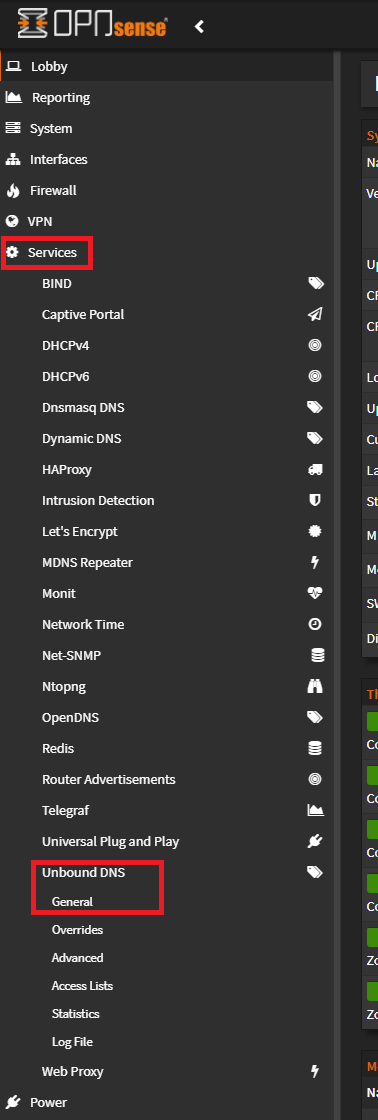
The general menu has a section for custom options.
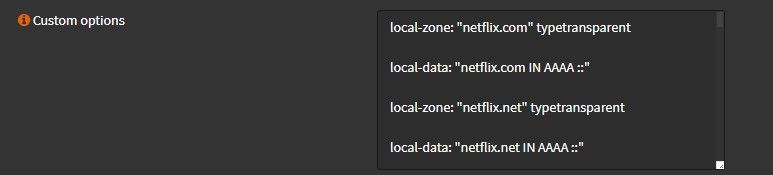
Here's the full list of Netflix options for Unbound that I currently have configured.
local-zone: "netflix.com" typetransparent

local-data: "netflix.com IN AAAA ::"

local-zone: "netflix.net" typetransparent

local-data: "netflix.net IN AAAA ::"

local-zone: "nflxext.com" typetransparent

local-data: "nflxext.com IN AAAA ::"

local-zone: "nflximg.net" typetransparent

local-data: "nflximg.net IN AAAA ::"

local-zone: "nflxvideo.net" typetransparent

local-data: "nflxvideo.net IN AAAA ::"

local-zone: "www.netflix.com" typetransparent

local-data: "www.netflix.com IN AAAA ::"

local-zone: "customerevents.netflix.com" typetransparent

local-data: "customerevents.netflix.com IN AAAA ::"

local-zone: "secure.netflix.com" typetransparent

local-data: "secure.netflix.com IN AAAA ::"

local-zone: "adtech.nflximg.net" typetransparent

local-data: "adtech.nflximg.net IN AAAA ::"

local-zone: "assets.nflxext.com" typetransparent

local-data: "assets.nflxext.com IN AAAA ::"

local-zone: "codex.nflxext.com" typetransparent

local-data: "codex.nflxext.com IN AAAA ::"

local-zone: "dockhand.netflix.com" typetransparent

local-data: "dockhand.netflix.com IN AAAA ::"

local-zone: "ichnaea.netflix.com" typetransparent

local-data: "ichnaea.netflix.com IN AAAA ::"

local-zone: "art-s.nflximg.net" typetransparent

local-data: "art-s.nflximg.net IN AAAA ::"

local-zone: "tp-s.nflximg.net" typetransparent

local-data: "tp-s.nflximg.net IN AAAA ::"

local-zone: "cast.prod.http1.netflix.com" typetransparent

local-data: "cast.prod.http1.netflix.com IN AAAA ::"

local-zone: "prod.http1.us-west-2.prodaa.netflix.com" typetransparent

local-data: "prod.http1.us-west-2.prodaa.netflix.com IN AAAA ::"
First, this specifies a local zone for each Netflix URL that we want to block. Typetransparent in Unbound means that any match found in local data will be answered by the server and matches of different types will be resolved normally. So in this case, AAAA requests for any of the given names will be resolved to the IPv6 unspecified address :: and requests for A records will be forwarded. IPv6 rules dictate that the unspecified address must not be used as the destination address of IPv6 packets or in IPv6 Routing headers and that an IPv6 packet with a source address of unspecified must never be forwarded by an IPv6 router.
In laymen's terms, the DNS server is going to send all IPv6 Netflix traffic to the toilet. Once the Netflix app figures out that it can't contact the Netflix servers on IPv6, it will attempt to contact them over IPv4 which, of course, will succeed.
Okay, you thought we were done. This is all well and dandy as long as you don't use a Chromecast. If you use Netflix on a Chromecast, read on. Google thought they'd be clever and program the Chromecast to prefer to use Google's DNS servers over whatever is acquired via DHCP. So you'll need a firewall rule that doesn't allow DNS traffic from the Chromecasts to any DNS server except your own. Once the Chromecast realizes that it can't contact Google's DNS servers, it will fall back to my internal DNS server.
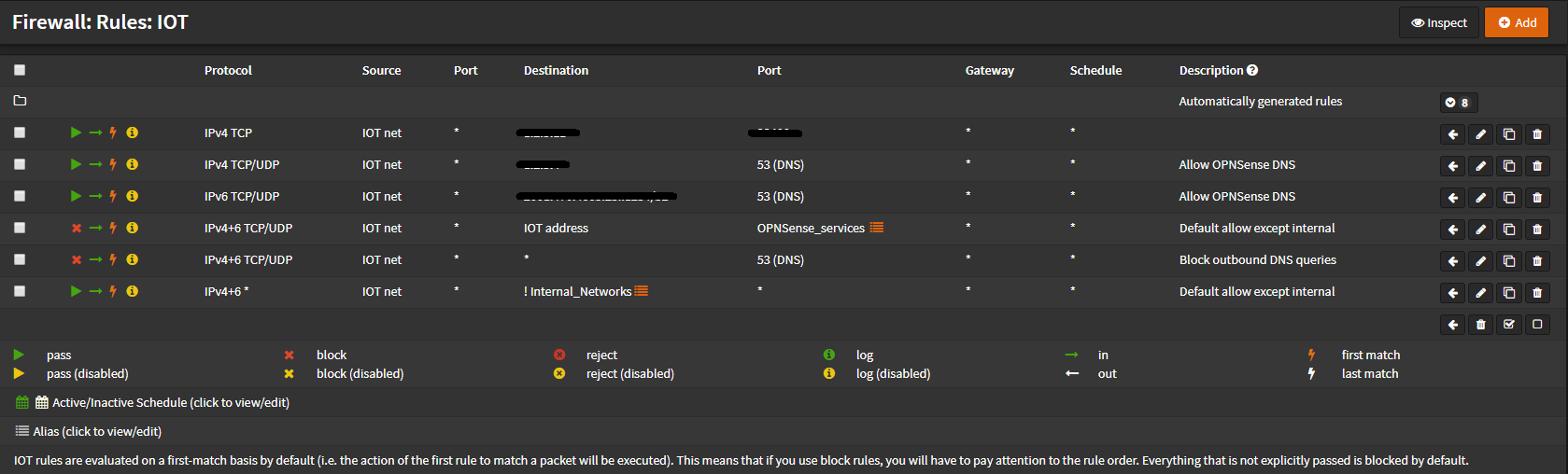
I have a network just for my IOT devices to keep them isolated from other hosts on the network. First, I'm allowing DNS to the IPv4 and IPv6 addresses of my internal DNS server. Then I'm blocking access to various services on the firewall and, more importantly, access to any other DNS server. The final rule is an inverse match on all other internal networks in my house. Traffic that hits that rule that isn't destined to one of those networks will be allowed.
So there you have it. I'm free once again to use IPv6 when my ISP doesn't give it to me and my wife stays happy.